
Features
PsiAssistant
NewPsiSuite's AI assistant built exclusively for psychologists
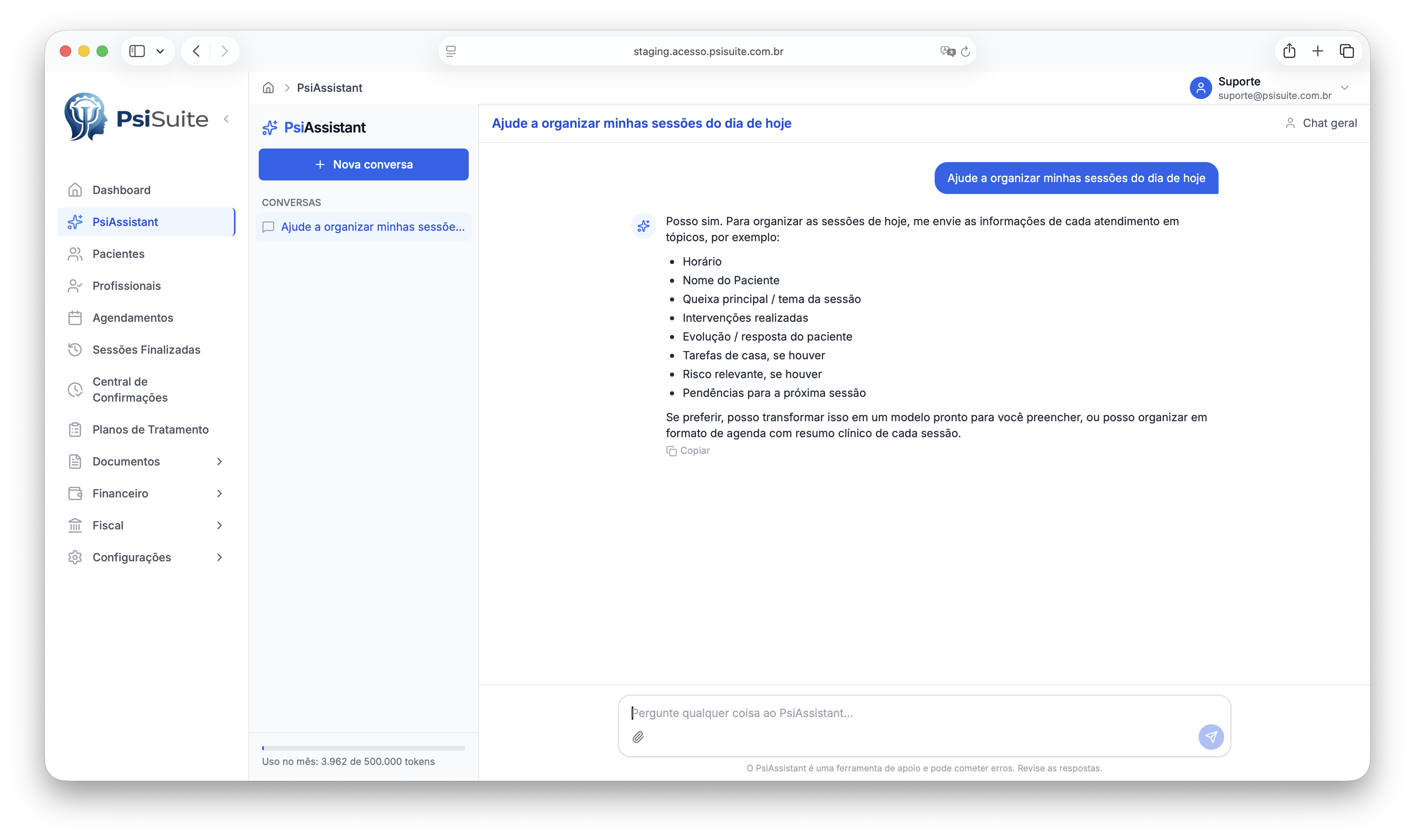
PsiAssistant is PsiSuite's artificial intelligence assistant. Available right inside the system, it helps you think through a case, write documents and prepare materials in a single conversation. When you pick a patient, it takes into account the case formulation, treatment plans and recent sessions from the record. Ask for a progress summary, a psychological report, an attendance declaration or a homework assignment and leave the writing to the AI. The document opens next to the conversation, you edit it and download a PDF with your clinic's visual identity. Patient data such as name, CPF and date of birth is filled in by PsiSuite itself. You stay in charge of every clinical decision: PsiAssistant is a support tool, it does not diagnose and does not replace the professional's judgement. Review everything before using it. PsiAssistant replies in Brazilian Portuguese. Included in the Plus plan, with monthly usage included in the plan.
What PsiAssistant does for you
- Record as context: when you pick a patient, the AI considers the case formulation, treatment plans and recent sessions
- Clinical reasoning support: hypotheses, patterns, beliefs and schemas, with suggested interventions and homework that cite the approach (CBT, ACT, DBT, Schema Therapy and others)
- Documents ready to review: psychological reports, declarations, feedback documents and progress summaries, guided by CFP Resolution No. 06/2019, editable next to the chat and downloadable as PDF with your clinic's branding
- Patient materials and diagrams: psychoeducation, record sheets, homework, safety plans, case formulation maps and timelines
- Reads handwritten canvas notes, images and PDFs you attach
- Private conversations: each professional sees only their own, with a saved history that can be linked to patients
- Attention to risk signs: highlights risk and recommends a structured risk assessment, a safety plan and a support network (CVV 188, SAMU 192, CAPS in Brazil). The decision is always the professional's
- You control what is sent: the patient's name is replaced by "Paciente", CPF, email, phone and address are not consulted, and attachments are only sent when you attach them. Free text and attachments may contain identifying information, so review what you attach
How it works
- 1
Open PsiAssistant
Find PsiAssistant in the PsiSuite menu, right below the Dashboard, and either pick a patient or just start a free conversation.
- 2
Ask for what you need
Type something like "Summarise the progress" or "Draft a report". If you want, attach a note, image or PDF.
- 3
Review, edit and download
The document opens next to the conversation. Adjust anything you like and download it as a PDF with your clinic's branding.
Example requests
- “Summarise the patient's progress over the last sessions.”
- “Suggest CBT interventions for generalised anxiety.”
- “Draft a psychological progress report.”
- “Which techniques can I use for cognitive restructuring?”
- “Generate an attendance declaration.”
- “Build a case formulation map for this patient.”
Frequently asked questions about PsiAssistant
Does PsiAssistant replace the psychologist or make diagnoses?
No. It is a support tool. It does not issue definitive diagnoses and does not replace clinical judgement; the final decision always belongs to the professional.
Can the AI make mistakes?
Yes. That is why every answer and every document must be reviewed before use. PsiAssistant itself reminds you of this on screen.
What is sent to the AI?
Only what you ask for and what you choose to use as context: your message, the conversation history and, if you select a patient, a summary of the record (age, case formulation, treatment plans and recent sessions) in which the patient's name is replaced by "Paciente". The patient's CPF, email, phone and address are not consulted. Attachments are only sent when you attach them. Free text and attachments may contain information that identifies the patient, so review what you attach.
Who can see my conversations with PsiAssistant?
Each professional sees only their own conversations, even within the same clinic.
Can I edit the documents PsiAssistant generates?
Yes. The document opens in an editor next to the conversation and you adjust the text before downloading. Edits are kept only while the screen is open, so download the PDF before leaving. The PDF is generated as an image, so its text cannot be selected.
Does the PDF come out with my clinic's branding?
Yes, with the logo, header, footer or letterhead set up in the clinic settings.
Can I chat without choosing a patient?
Yes. With no patient selected, PsiAssistant works as a free chat for theory questions, intervention ideas and writing materials.
Can I attach files and notes?
Yes. You can attach images, PDFs, record attachments and the handwritten session notes (the PsiSuite canvas). Up to 5 attachments per message, each up to 10 MB, in PNG, JPG, WebP or PDF format.
What language does PsiAssistant reply in?
Brazilian Portuguese.
Which plan includes PsiAssistant?
PsiAssistant is included in the PsiSuite Plus plan, with monthly usage included in the plan. See the current prices on the plans page.
See it working in your practice
30 days free, no credit card required. Cancel anytime.